Learn to Find the Key of a Song by Ear
Watch the video to get started.
Learn to Find the Key of a Song by Ear
Watch the video to get started.

Multi Layer Drum Sampler AU / VST Instrument
The MT Power Drum Kit is a free drum sampler offering the powerful, high-quality sounds of an acoustic, realistic drum kit. Samples have been specially recorded and processed to make them ideally suited for use in pop, rock and metal productions.
The MT Power Drum Kit Sampler differs from other, expensive drum samplers in that we have already pre-processed the sounds with compressors and EQs to make them a perfect fit for any mix. This is precisely where many drum sample programs fail. Some of the expensive plugins available on the market deliver a highly natural and dynamic drum kit sound as a solo instrument, but many fail as soon as they are supposed to be used for a complete mix in a powerful pop or rock production. Either the kick drum suddenly sounds much too slack or fuzzy in the mix, or the snare drum, which initially sounds natural and dynamic in solo mode, suddenly gets lost in the background in the overall mix, drowned out by the guitars and other instruments. But this is exactly where the MT Power Drum Kit is strongest. Its kick and snare drums come through clearly in any mixing situation – and still sound natural and not overly compressed.
The compressors built into the channels give you even more control over the level of compression.
You can choose from thousands of assorted rhythms in the comprehensive Groove Library and compose your own drum accompaniment. In particular, the innovative functions for creating fills generate very smooth and realistic drum tracks (see video).
Because we used high-quality cymbals and microphones for the recordings, the crash, ride and hi-hat cymbals sound especially refined and pleasant at various velocities.
As early as during microphoning of the set and recording of individual samples, we took great care to replicate realistic circumstances. Although doing so is almost impossible, we broke with tradition in sample recording, which calls for capturing every sound individually; Instead, our studio drummer played entire grooves. Then, we cut most of the necessary sounds out of the grooves, in various velocities, and processed them to deliver samples as realistic as possible. This is especially clear with our hi-hat samples, for instance. On the right-hand side, you can listen to demo tracks to hear the impressive results.
System Requirements:
PC: Windows 11 / 10 / 8 / 7 / Vista
Mac: OS X 10.5 or higher, Intel or ARM (M1/M2/M3/M4/M5/...) cpu
Linux: Ubuntu, Arch, Fedora, openSUSE
MT-PowerDrumKit will work in most hosts that support the VST, AAX or AU standards.
Tested hosts:
Ableton Live
Akai MPC
Ardour
Bitwig-Studio
Cakewalk
Cantabile
Cubase
Digital Performer
FL Studio
GarageBand
Jeskola BUZZ
LMMS (no drag and drop)
Logic
LUNA
Magix Music Maker
Mixbus
Mixcraft
MPC Beats
MuLab
Next
Nuendo
Pro Tools (v. 10 and higher)
Podium
Reaper
Reason
Renoise
Samplitude Music Studio
Sonar
SoundBridge (on Windows)
Studio One
Tracktion
Waveform

VST Alarm has launched a promotion on a collection of presets for the Vital spectral warping wavetable synthesizer.
Vital Calmness by Vicious Antelope is offered as a free download for the next few weeks.
The Vital Calmness soundbank is all about tranquility, offering 40 soothing pad presets for the Vital synth plugin. Designed around a sine-based wavetable, these presets are very close in terms of sounding and they deliver a calming tone. Perfect for ambient genres, they excel at adding a gentle, serene layer to your track whenever a touch of simplicity and peace is needed.
The soundset is free to download until February 15th, 2026.
https://vstalarm.com/?wpam_id=3

Waves Curves Resolve
Waves Audio has announced the release of its new Curves series effect plugin which is designed to solve mix conflicts automatically.
Curves Resolve is offered for free for two days only.
Curves Resolve provides an intelligent way of solving conflicts between multiple tracks in your mix. It processes one track by listening to another, carving space only when and where there’s a clash.
The result: no masking, no congestion, no mud. A cleaner mix that breathes, letting all your sounds fit together beautifully. And it’s almost impossible to overprocess – more transparent, with more control than any alternative.
Curves Resolve features
Solve mix conflicts – instantly.
Intelligent carving – both dynamic (real time) and steady (learned).
Intelligent ducking – wide (classic) and frequency specific (smart).
Snapshot controls – carving modes optimized for specific instruments.
Sidechain adjustment controls.
Includes Curves Resolve Live – zero latency version.
Available for Windows and Mac (VST3, AU and AAX), Curves Resolve is free through January 20th, 2026.
https://rekkerd.org/out/waves-curves-resolve/

TeAr: Free polyrhythmic & polyphonic MIDI arpeggiator plugin
Some of the links in this article may be affiliate links, which means I will receive a small commission if you make a purchase. There's no additional cost to you, and you'll directly support Rekkerd, thanks!
FX-Mechanics TeAr
FX-Mechanics has announced the release of a beta version of a free and open source polyrhythmic and polyphonic MIDI arpeggiator plugin.
Featuring 4 independent arpeggiator engines, each with its own pattern, subdivision, and MIDI output channel, TeAr is designed to create complex, evolving musical phrases and textures.
At its core, TeAr is scale-aware. You can select a root note and one of many scale types, and the arpeggiators will intelligently conform to that musical context. A “Follow MIDI In” mode allows the scale’s root to be changed dynamically by the notes you play.
TeAr features:
4 independent arpeggiator engines: Create complex polyrhythms and layered melodic lines.
Per-arp controls: Each engine has its own On/Off switch, pattern editor, subdivision, and MIDI output channel.
Powerful pattern language: A rich text-based language for defining arpeggio sequences with modifiers for velocity, octave, and pitch.
Comprehensive scale library: A wide selection of musical scales and modes to define the harmonic landscape.
Visual feedback: A real-time scale display highlights the active scale, its root, and the notes currently being played by each arpeggiator, color-coded for clarity.
TeAr for Windows and Linux is free to download in VST/VST3 plugin formats.
https://github.com/odoare/TeAr/releases

Tilr QDelay
Tilr has released a new delay effect plugin for Windows, Mac and Linux.
A dual-delay that is designed to be quick to use, QDelay is based on popular units such as Replika XT by Native Instruments and EchoBoy by Soundtoys.
The main goal is to create a free and open plug-in for my own productions, an alternative to the popular Deelay by SixthSample without premium versions or trimmed features or on-line activation.
QDelay features
Stereo Dual Delay with independent delay times and multiple modes.
Ping-Pong mode with feedback width control.
Tap mode with offset time (tap) and delay time.
Swing and Feel offset.
Accent odd or even taps.
Reverse delay.
Parametric EQ on feedback and input signal.
Diffusion on pre or post delay signal.
Modulation of delay line time.
Pitch Shifter on the feedback or post delay signal.
Saturation on pre and post delay signal (optionally on Feedback path).
Color, Bias and Dynamics controls for saturation.
Ducking to muffle the delayed signal on input.
Tape wow and flutter to add tone variation.
Taps preview display.
QDelay is available to download in VST3, AU, and LV2 plugin formats.
More information: Tilr
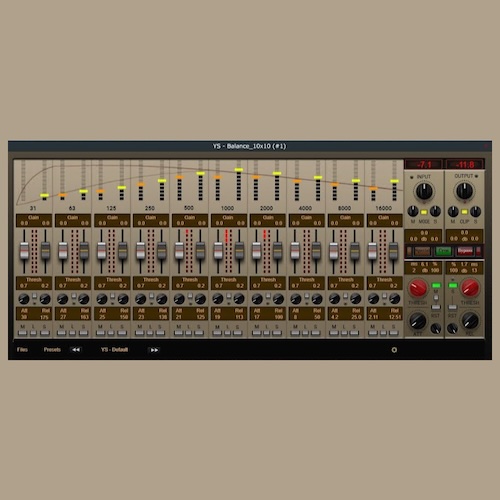
Plugin de áudio para mixagem.
Equalizador dinâmico de dez bandas com a possibilidade de usar nos modos Esquerda-Direita, Dois mono. Canal central-lateral.
O plugin tem duas versões, estéreo e mono, para economizar recursos do processador.
youtu.be/Rgot2U_KObQ
Se os controlos não forem exibidos devido a uma placa de vídeo fraca, substitua as imagens na raiz da pasta “Resources” do plugin por imagens com menor renderização
da pasta 101 . Por predefinição, todos os elementos estão configurados para uma transição suave com o quadro 201.
Agradecimento ao desenvolvedor:
yoomoney.ru/to/4100124...
https://drive.google.com/file/d/1mh5y7hiocgRe2cQbxz6KhIwQROfAwHbU/view

The purpose of this alpha build is to test the core features of Audacity 4 on a wide selection of hardware and operating systems.
Alpha 2 contains further work to bring Audacity 4 to feature parity with Audacity 3, as well as important bug fixes.
A note on compatibility
Projects saved in Audacity 4 are not backwards compatible. We recommend you make a copy of your important projects before opening them in Audacity 4.
What's implemented
Recording and playback
Editing audio
Applying destructive and real-time effects
Exporting audio files
Saving and recalling custom Workspaces
What's not implemented
Some yet-to-be finalized features might appear non-functional, or have been excluded from Audacity's interface. These are features not yet ready for user testing, and have been disabled.
Nyquist, LADSPA and VAMP and the OpenVINO plugins
Preferences from Audacity 3 are not carried over
Envelopes and label tracks
Spectrogram view and the spectral editing mode
Most built-in effects, including generators and analyzers
Opening multiple projects at the same time
Notable changes since alpha-1
Allow track range selection using Shift-Enter (#9600)
Record from anywhere (#9540)
Export loop region (#9489)
Preference for paste behavior (#9612)
Preference for whether clicking on ruler should trigger playback (#9707)
Create loop region only when Control / Cmd key is pressed (#9712)
Smoother playhead (#9613)
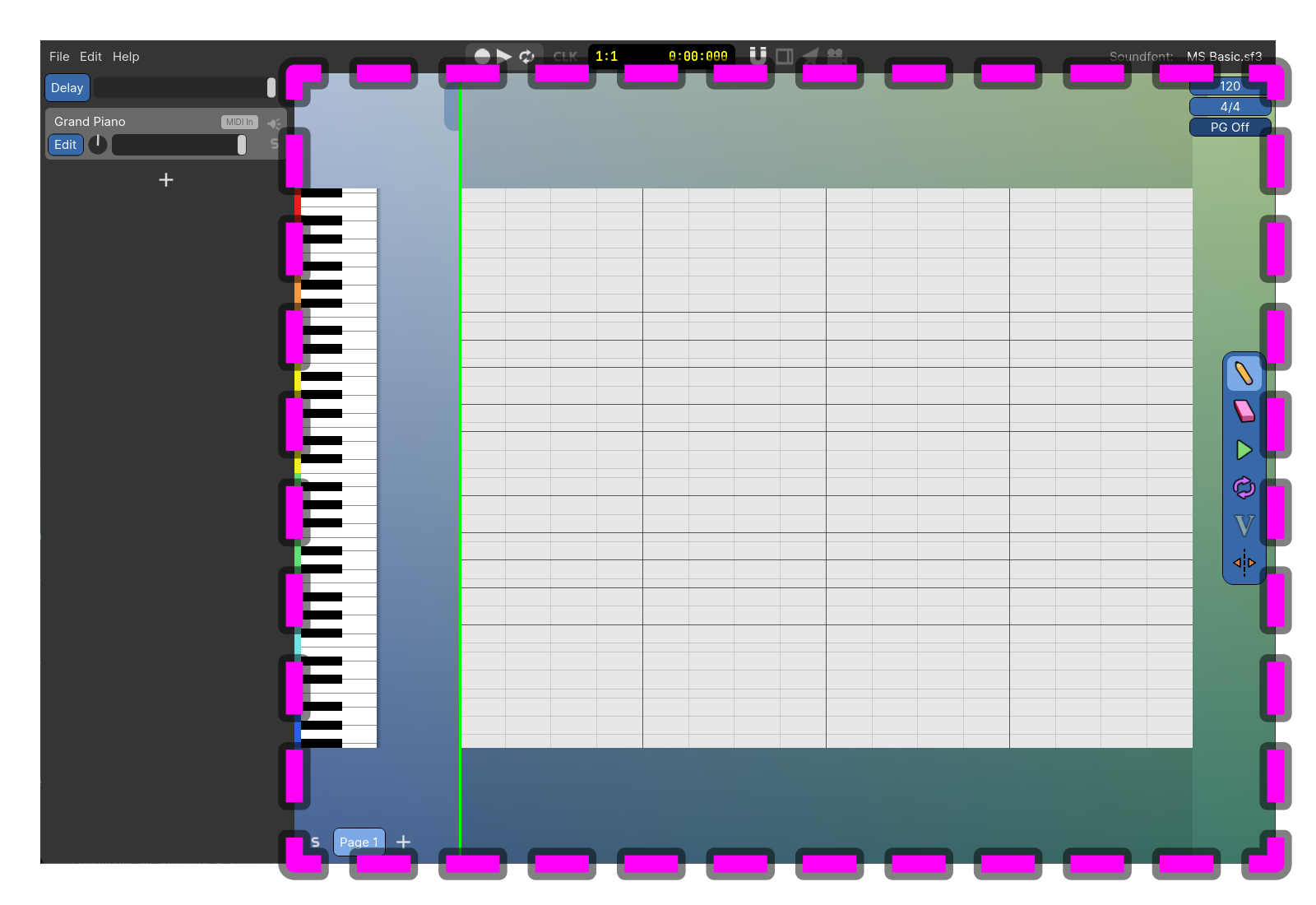
Try Out My Music Making Program!
Power composer is an easy to use program for making music with MIDI and Soundfonts. You can start making music immediately by clicking in the Note Area to create Notes and then pressing the Play Button.
https://powercomposer.net/download.html
https://powercomposer.net/docs.html
Mayerism is an open-source plugin inspired by John Mayer's signature tones. Built on top of the NeuralAmpModelerPlugin, it focuses on ...


