quinta-feira, abril 09, 2026

Intelligent MIDI patterns generator


Stepista

by Mr Jefferson

Intelligent MIDI patterns for every producer.

Generate production-ready patterns for Ableton Live, Logic Pro, and any DAW. 24 genres. 13 parameters. Completely free.


Step 1

Load the plugin

Add Stepista as a VST3 instrument on a MIDI track in your DAW.

Step 2

Route the MIDI

Set the MIDI output of Stepista’s track to another track that has a synth or instrument loaded.

Step 3

Hit play


Stepista generates patterns in real time. The receiving instrument plays them automatically.

Tested in Ableton Live. Should work in any DAW that supports VST3 and MIDI routing.

Using a different DAW? I'd love to hear how it goes.


Three steps to a new pattern

01

Choose a style

Pick from 24 electronic music genres. Set your key, mode, tempo, and parameters.

02

Generate

Hit Gen. The engine creates a pattern matching your style and constraints in seconds.

03

Export

Drag MIDI directly into your DAW or download as .mid.


https://stepista.vercel.app/#download


quarta-feira, abril 08, 2026

Chord Dock Lite: Free chord progression editor plugin


Chord Dock Lite: Free chord progression editor plugin

Chord Dock

k2get has recently released version 1.5 of its a chord track-style plug-in for building, visualizing, and sharing chord progressions on a timeline.

Chord Dock Lite is designed for songwriters and producers who want to create and edit chord progressions on a timeline directly inside their DAW, organize sections such as Verse and Chorus, keep the harmonic structure of the whole song in view, and export progressions instantly as MIDI.


Chord Dock Lite features:

  • Timeline-based chord progression editing.
  • Section-based workflow.
  • Section Clips / Focus Edit.
  • Save and load progression files.
  • Instant MIDI drag export.

The plugin is available in VST3 and AU plugin formats for Windows and macOS. An Extended Edition is on sale for the intro price of $19 USD through April 30th, 2026 (regularly $25 USD). It unlocks tensions, slash chords, interactive Circle of Fifths, Arpeggio / Bassline, Reharmo, user preset save, and custom themes.

Build, visualize, and share chord progressions.

A chord-track-style workflow with reharmonization

Chord Dock v1.5 lets you see the whole progression on a timeline, edit it visually, then reharmonize it and generate section-based Arpeggio / Bassline from the same progression.

Lite and Extended share the same installer. Start with Lite for free, then unlock Extended whenever you need more.


https://k2get.github.io/chord-dock-site/index.en.html

terça-feira, março 31, 2026

The Black Widow Drums


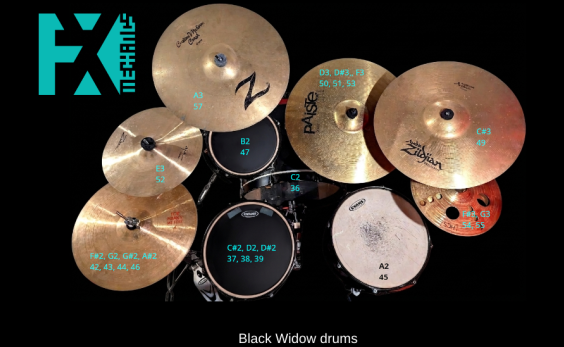
The Black Widow Drums project is the first published drum sampler showcase for FxmeSampler's advanced spatial and processing features. Recorded on a Gretsch Black Widow kit, it utilizes an original microphone array and signal processing chain to deliver a studio-ready drum sound.

BIG MON


Professional monitoring and metering for mixing, mastering, and broadcast delivery.

Big Mon Monitoring Plugin Interface - Free VST AU CLAP Plugin

📏

EBU R128 Loudness

Momentary, Short-Term, and Integrated LUFS metering with ITU-R BS.1770-4 K-weighted filtering and gated measurement.

📈

True Peak Detection

ITU-R BS.1770-5 compliant true peak measurement using 4x polyphase oversampling with the official 48-tap FIR filter.

🎧

Stereo Monitoring

L/R Swap, Mono, Side, and Difference modes with click-free crossfading for stereo analysis and mono compatibility checks.


https://www.bigman-labs.com/products/big-mon/

SongEngine for free


The free chord progression builder and MIDI generator plug-in for all music producers.

✔ Free download.

✔ Works in all major DAWs.

✔ All content royalty free.

Have you ever struggled with writer's block when you wrote a track? Did the chords sound bland? Were the keys "somewhat OK", and the basslines only so-so?

You can leave all this behind. SongEngine generates MIDI files that follow your chords perfectly. Just drag, drop, and stay in your creative flow.

Comes with several built-in preset packages

How SongEngine works

SongEngine is very easy to use:

1. Build your chords

Import a MIDI file, drag chords from the Chord Pad Area, or let SongEngine generate a progression for you.

2. Pick a preset

Browse dozens of presets – basslines, arpeggios, phrases. Press play in your DAW to preview instantly.

3. Drag to your DAW

Like what you hear? Drag & drop the MIDI directly into your session. Done.


  Download SongEngine for free


https://feelyoursound.com/songengine/


U-he Zebra 3: the final beta of the modular Synthesizer plugin is out now

  U-he Zebra 3, the long-awaited successor of the Zebra 2 modular Synthesizer plugin is now ready for test in public beta Since mid-December...