Ultimate Vocal Remover v5
The best vocal remover application on the internet, and it's totally free and open source!
Available on Windows, Mac, & Linux
Ultimate Vocal Remover v5
The best vocal remover application on the internet, and it's totally free and open source!
Available on Windows, Mac, & Linux

Plugin Alliance currently offers Animate by Mastering The Mix for free (regularly $66). The offer lasts until March 24th and is limited to one license per user.
If you missed our own Animate freebie offer a couple of years ago, here’s another chance to get it for free.
Animate works on Windows and macOS in AU, AAX, and VST3 formats.
So what does it do?
Animate is a mixing tool that can be used on individual tracks, groups, or on the master chain itself. The plugin can do frequency-specific expansion, saturation, transient shaping, and widening in either mid/side or L/R mode.
Inject tracks with more energy, use the frequency-specific action in combination with the threshold to do surgical fixes on full mixes. Alternatively, use it as a finalizer to add more punch and movement to mixes that sound dull.
Animate has four modes that can be used separately or processed in series.
Expand
Expand is an upwards expander controllable with attack, release, ratio, and amount, with optional frequency-targeting. The concept of expansion can be confusing to some, as it is easily conflated with upwards compression, but this is not the same.
An upward expander increases the dynamic range of the material.
Everything above the threshold is boosted further. If you want more punch out of a kick or more tick from a high-hat, or perhaps even to lift a certain frequency region of your track under intense moments in the mix, an expander might be a good choice.
Sometimes a transient shaper does the job even better, which leads us to…
Punch
A transient shaper that can be configured to react to most of the transient material of your mix or just the most prominent elements. These can then be dialed in with frequency-specific targeting in m/s mode for even more control when used on a full track.
Maybe you want transient action in the side channel for more width or wide-band transient action targeting the kick and snare in the mid channel for a more grounded and punchy mix.
Ignite
Bring out clarity and body with musically relevant harmonics that dynamically react to your signal, with the aforementioned possibility of limiting the processing both frequency-wise and stereo-wise for detailed control.
A nice module for blowing up some boring pads or brightening a dull mix.
Grow
Add dynamic and frequency-dependent stereo-widening to make static tracks more interesting or to a full mix for subtle widening on snare hits, for instance.
Just beware not going overboard when using Grow on full mixes to ensure that there’s still mono compatibility.
The modules have side-chain inputs as well, which makes them even more flexible.
The focus on dynamic and frequency-dependent processing in combination with an intuitive UI ensures an effective workflow where you can solve problems or polish things quickly.
Just a heads-up, you’ll need an account with Plugin Alliance to download the plugin.
Download: Animate (FREE until March 24th – Plugin Alliance account required)
https://www.plugin-alliance.com/products/animate

Mayerism is an open-source plugin inspired by John Mayer's signature tones. Built on top of the NeuralAmpModelerPlugin, it focuses on faithfully recreating the feel and response of Mayer's most iconic amplifiers, paired with a carefully curated pedalboard for expressive, touch-sensitive playing.
Mayerism is designed as a single, cohesive guitar plugin. The goal is not endless options, but a ready-to-go platform that allows players to quickly achieve the inspiring tones of the last true guitar hero, without sacrificing feel, touch, or musical dynamics.
Features
Amp Section:
John Mayer–inspired amp simulation Neural amp modeling based on the tonal characteristics of Mayer's most famous amplifiers, focusing on:
Clean to edge-of-breakup response.
Touch sensitivity and pick dynamics.
Smooth midrange and glassy high end.
Integrated Pedal Suite:
Tube Screamer–style Overdrive Classic mid-forward drive with Drive, Tone, and Level controls.
Compressor Transparent compression for sustain and control, ideal for clean and blues tones.
Clean Boost Transparent gain stage for pushing the amp or lifting solos.
Chorus Subtle modulation for width and movement, suited for clean and lightly driven tones.
Delay Musical delay for rhythmic repeats and ambient textures.
Reverb Smooth reverb for space and depth, from subtle room ambience to lush tails.
Tone Shaping & Utilities:
Tone Stack EQ Bass, Middle, and Treble controls tuned for Mayer-style voicing.
Noise Gate Controls noise and feedback without affecting playing dynamics.
Doubler Adds stereo width and depth.
Input / Output Gain Independent level control for gain staging and plugin integration.
Presets & Interface:
Preset Management Save and load presets that store your settings.
Real-time Metering Input and output level visualization.
Multi-page Interface Cleanly organized sections for:
Pre-effects.
Amp.
Post-effects.
https://github.com/timpelser/Mayerism/releases

If you’ve ever wondered how to make a soundboard on your keyboard, this software gives you an easy and intuitive solution. It displays a virtual keyboard where each key can be bound to a different sound file, allowing you to instantly play effects, music notes, or samples with a simple key press.
Whether you want a midi keyboard soundboard–style experience or a custom setup for sound effects, this application works with all keyboard layouts and includes an optional matrix view visualization. No extra hardware is required—just your laptop or desktop computer keyboard.
You can use the built-in sounds or fully customize your setup by loading your own WAV, MP3, MP2, MP1, AIFF, OGG, or M4A files with the Redefine Keys feature. This makes it easy to learn how to bind sounds to keys and create a personalized soundboard tailored to your needs.
The Hotkey Mode allows sounds to be triggered even when the application is running in the background. This makes it ideal for streamers, DJs, gamers, and anyone looking for how to get a soundboard for Valorant, Fortnite, Call of Duty, Apex Legends, CS:GO, Overwatch, Minecraft or other games—play sound effects live without interrupting gameplay or other applications.
With this program, your keyboard becomes a creative tool for music, gaming, streaming, and sound design.
home page:

Transpanner 2 is a "pay what you want" 3D audio plugin optimized for stereo loudspeakers. This release redefines what a spatial audio tool can be, setting a new benchmark in its category!
How to download:
Name a fair price (or enter $0 to download for free)!
download the Win or Mac installer and follow the instructions (no license needed)
open up your DAW and add Transpanner on a Stereo track. Have fun!
Compatibility:
Mac (Intel/M1/M2): macOS 10.11 and newer (Formats: AU & VST3)
Windows (x64): Windows 10 and newer (Format: VST3)
Any DAW that supports VST3 or AU formats.
Choose the angle and distance: Introducing the Polar Pad
Transpanner 2 introduces a polar pad interface with a design of concentric circles that animate as you drag the virtual thumb.
Moving the thumb around the pad's center enables precise control over sound direction, allowing you to select any angle from 0 to 360 degrees.
Moving the thumb inward sends sounds into the distance, while dragging it outward brings them closer.
This intuitive and tactile method of 3D audio manipulation enhances user interaction in stereo mixing.
Psychoacoustic Wizardry: Behind the 3D Sound Illusion
When you adjust the controls in Transpanner 2, it tailors these sound wave properties in such a way that your brain is tricked into perceiving the sound as coming from different directions, including from behind you. This creates a 3D audio effect, enveloping you in a more lifelike and immersive sound environment, all from a stereo setup.
True to our commitment to the audio community, Transpanner 2 will remain donationware. Users are encouraged to support further development with contributions that reflect the value they find in the tool.

The Crow Hill Company releases Icky Bass free Vaults series library
The Crow Hill Company Icky Bass
The Crow Hill Company has introduced a new Vaults series instrument named after the iconic White Stripes album, “Icky Thump”.
Icky Bass features the sounds of a rare Fender Rhodes Piano Bass fed through Jack Whites signatures Knife Drop fuzz pedal.
We decided to feed the Rhodes Bass through the Knife Drop fuzz pedal. Eventide and Jack White collaborated to make a hybrid fuzz and analog style synth voice, capable of generating sub-octave textures and aggressive filtered tones. It was recorded right here at Crow Hill HQ, into a beautiful Neve 1073 DI.
Our as-ever intuitive GUI allows you to dial in the grimy pedal sound, control the expressive potential of the bass and play around with more concentrated FX, including AUTOWAH, CHORUS, PHASER and REVERB.
Icky Bass is free to download, running in a dedicated plugin for Windows and macOS (VST/VST3, AU and AAX).
https://thecrowhillcompany.com/icky-bass/

Sunbunny Panoramatone
Sunbunny has introduced a vibrato effect plugin for Windows, macOS and Linux. Panoramatone is an analog-style pitch vibrato which adds lush vintage shimmer and organic movement to any sound.
A true stereo vibrato, the plugin delivers smooth pitch modulation with adjustable depth and rate. Subtle saturation and rich analog-style pitch shifting aims to give your sounds a warm analog character.
Available to download for free, the lightweight VST3 plugin uses near-zero CPU on all platforms.

Ink Slide FREE
Audio Plugin Deals has announced that it is offering Ink Audio’s deeply sampled slide guitar library for Kontakt as a free download for the next two weeks.
Ink Slide was recorded with a glass slide through classic analog compressors to deliver a uniquely mellow tone loaded with authentic texture.
Explore expressive performances using eight keyswitched articulations and 21 time-synced diatonic phrase sets. Dedicated controls for envelope, filter, and drive let you perfectly shape your tone.
Further enhance your sound with a reverb plugin utilizing impulse response to place your guitar in lush acoustic environments. Grab this $60 value FREE for two weeks!
Available for the full version of Kontakt 6.8 or higher, Ink Slide is free until March 19th, 2026.
https://audioplugin.deals/product/ink-slide-by-ink-audio/
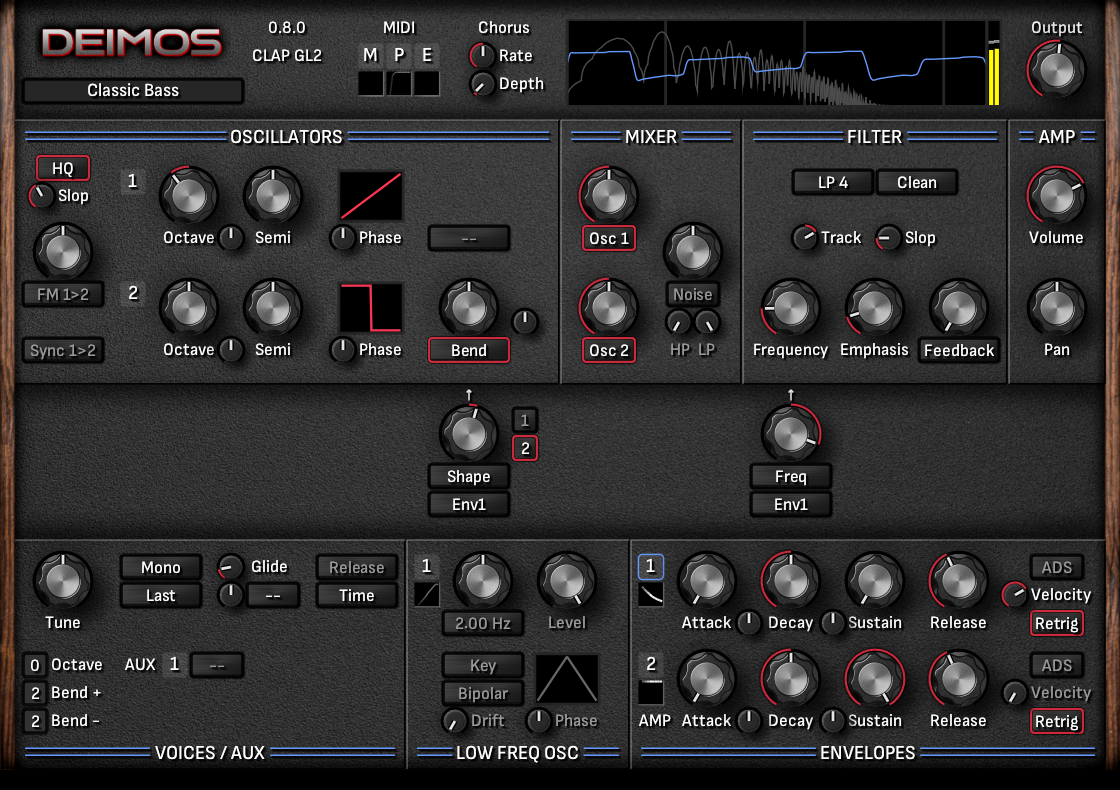
Deimos is a free synthesizer plugin focusing on high quality sound and ease of use.
Feature Summary
2 oscillators with various waveforms and waveform manipulation modes
Oscillator frequency/phase/shape modulation and hard sync
Mixer with noise source and ring modulation option
Filter with several modes and 2 character options, additional feedback paths or dual peak split
2 envelopes with curvature control
1 LFO with various waveforms and modes
1 additional modulation processor slot: envelope, lfo, sequence, math, ...
9 modulation slots
Chorus effect
Fixed internal sample rate so your presets sound the same everywhere
Oscilloscope and spectrum analyzer
System Requirements
In order to use the plugin, a compatible DAW and a modern CPU are required.
Available plugin formats:
Windows: CLAP, VST3
MacOS: CLAP, VST3, AU
Linux: CLAP
https://tom-trnk.itch.io/deimos

Verberate Basic
The Revolutionary Vivid Hall Algorithm for Free
The free Verbarate Basic is based on and offers the same highly praised audio quality. The plug-in offers four high quality presets from Verberate 2 that showcase the quality and versatility of the algorithm:
Plate, a realistic simulation of plate reverb with the typical frequency dispersion and decay properties that give plate reverb the airy touch
Room, a beautiful and warm wooden room that gives a great sense of room without being obtrusive
Hall, a natural and gorgeous sounding hall
Lush Hall, a colorful out-of-world hall with frequency modulated tails that sounds amazing on synth pads
The intuitive user interface has buttons for each of the four reverb programs along with a mix knob that let’s you adjust the dry and reverb signal levels.
Acon Digital Verberate Basic 2 is available as VST, VST3 or AAX for both Windows and Mac or as AU plug-ins for Mac. There are 32 and 64 bit versions for Windows. The Mac version is 64 bit and runs natively on both ARM (such as Apple M1) and Intel processors.
PC Version (Windows)
Windows 7 / 8.x / 10 / 11
Intel Core i3 or AMD multi-core processor (Intel Core i5 or faster recommended)
1366 x 768 display resolution (1920 x 1080 or higher recommended)
1 GB RAM (4 GB or more recommended)
1 GB free HD space
A host application that is compatible with (32 bit or 64 bit) VST , VST3 or AAX (Pro Tools 10.3.5 or higher)
Macintosh Version (macOS)
macOS / OS X 10.9 or later
Runs natively on ARM64 and Intel
1 GB RAM (4 GB or more recommended)
1 GB free HD space
A host application that is compatible with (64 bit) AU, VST, VST3 or AAX (Pro Tools 11 or higher)
Quick Links
https://acondigital.com/products/verberate-basic
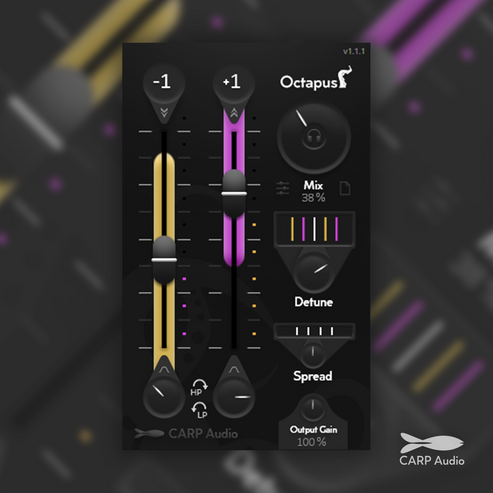

MegaMod snaps onto the bottom of any third-party plugin, allowing users to assign LFOs to pitch, drive macro knobs to morph entire EQ curves, or blend seamlessly between multiple presets of their favorite effects. MegaMod unlocks creative workflows that were previously tedious or impossible.
MegaMod’s panel dynamically resizes to perfectly match any plugin it’s attached to, creating a single, unified interface. MegaMod works as a plugin that hosts a plugin inside of it, exposing the parameters for modulation. There’s no juggling windows, no more clutter, and no more guessing which modulator controls which effect. Modulation becomes intuitive, visual, and completely seamless.
MegaMod brings powerful modulation to any DAW, dramatically reducing the need for complex automation lanes and, in many cases, removing them entirely. Work faster by adding envelope-controlled saturation to drums using your favorite saturator, or use LFOs and Macros to create evolving filters with your favorite EQ. The possibilities are endless.
MegaMod launches with a powerful and growing set of modulators. Available at release are the LFO,, Randomizer, XY Pad, Macro Knob, and a Preset Blender, with more modulators planned for future updates. Each modulator is designed to be fast, flexible, and rearrangeable, enabling everything from subtle movement to complex, evolving transformations with any plugin.
The first public beta of MegaMod for Windows and macOS (VST3, AU and AAX) is available now and completely free for a limited time. Users can help shape what comes next, with their ideas, experiments, and feature requests directly influencing its evolution.

Some of the links in this article may be affiliate links, which means I will receive a small commission if you make a purchase. There's no additional cost to you, and you'll directly support Rekkerd, thanks!
Moonwave FX Parallax
Audio Plugin Deals has launched a promotion on Moonwave FX’s dual-engine sonic morphing effect plugin, offering Parallax as a free download for the next few days.
Parallax is a dual-engine multi-effect designed to sculpt sound between precision and abstraction. The Reality Engine tightens transients and harmonics for punch, while the Dream Engine dissolves audio into evolving textures and spatial depth.
A single Morph control lets you drift seamlessly between these two worlds, creating organic movement without complex routing. Smart parameter linking ensures every adjustment stays musical and balanced.
Available for Windows and macOS (VST3/AU), Parallax is free until February 26th, 2026.

Waveform Compressor
Free compressor with high-res dynamic visualiser and VCA/Optical modes.
Key Features
Flexible compressor controls - Threshold, Ratio (1:1 to 24:1), Attack (20 microseconds to 250 milliseconds), Release (25 milliseconds to 5 seconds), Knee (0dB to 18dB).
Regular/Optical modes - In Regular mode, attack and release curves are linear. In Optical mode, the attack time is variable, and the the release curve has two stages (50% in 1 second, then a slower tail for the remaining 50%).
Detector HPF - Apply a high-pass to the detector/sidechain circuit to shape what the compressor hears.
External sidechain - Sidechain the compressor to an external signal. HPF, LPF and Lookahead will now apply to the external sidechain audio.
Free preset library - 10 free presets to recreate different classic compressors.
GPU graphics - Waveform visualiser leverages GPU for increased performance.
Value typing - Double click to type in values.
Dynamic window resizing - Simply drag from the bottom right corner to resize the plugin.
Minimum requirements - macOS 10.13, Windows 10
Feedforward design - The compressor operates in a feedforward design with peak detection. This emulates the characteristics of VCA compressors, known for their versatility.
Delta listen - Hear exactly what the plugin is doing by listening to the delta (aka difference) between the dry and wet signal.
Waveform visualiser - Before/after waveform, gain reduction lines and threshold line. Pause function to freeze waveform. Zoom in/out. Enable/disbale bar and beat lines.
Built-in presets manager - Navigate included presets and save your own presets within the plugin.
Value windows - Exact values of each dial shown on hover.
Low CPU load - Optimized for efficient CPU usage, allowing a large number of instances. CPU load is lower than comparable compressors when optional modules are bypassed.
No license or activation required - Simply download and run the installer
AAX, VST3, AU.
https://woodstockaudio.com/products/waveform-compressor?utm_source=MasteringComYouTube

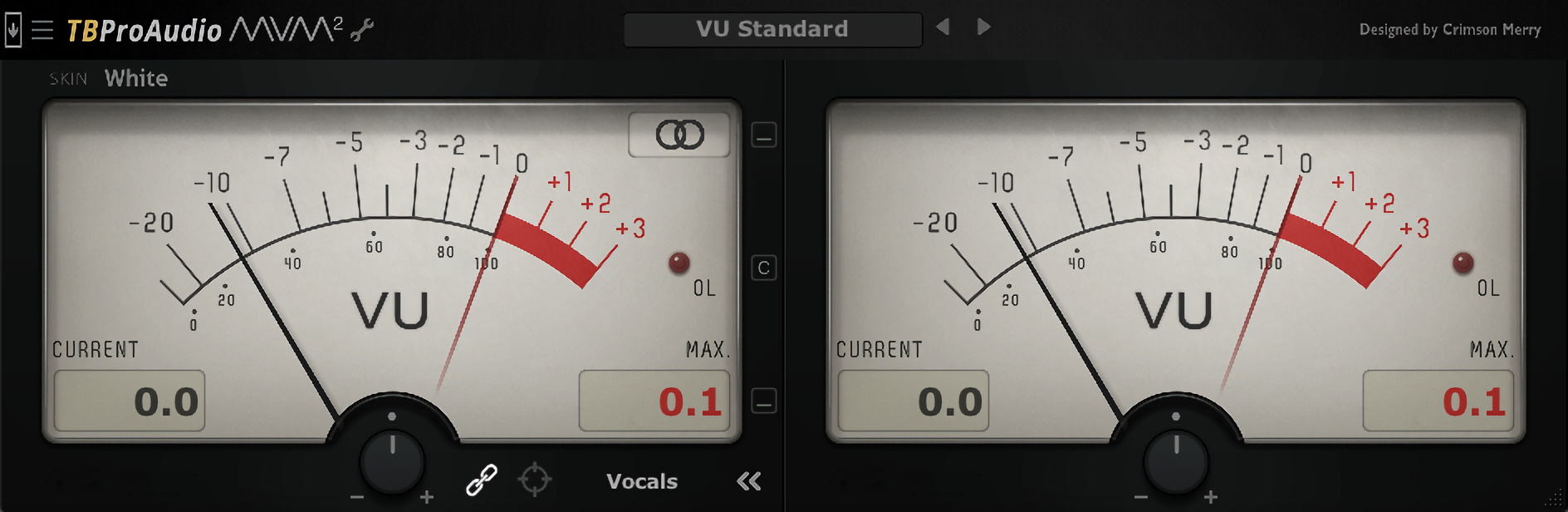
https://www.tbproaudio.de/products/mvmeter2
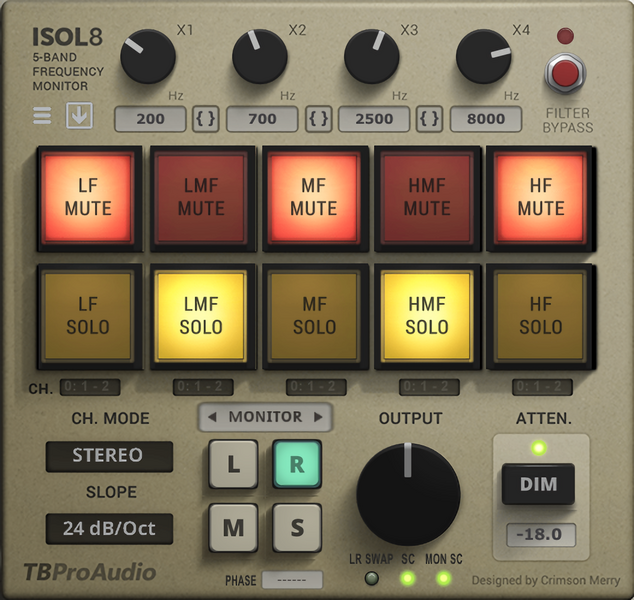
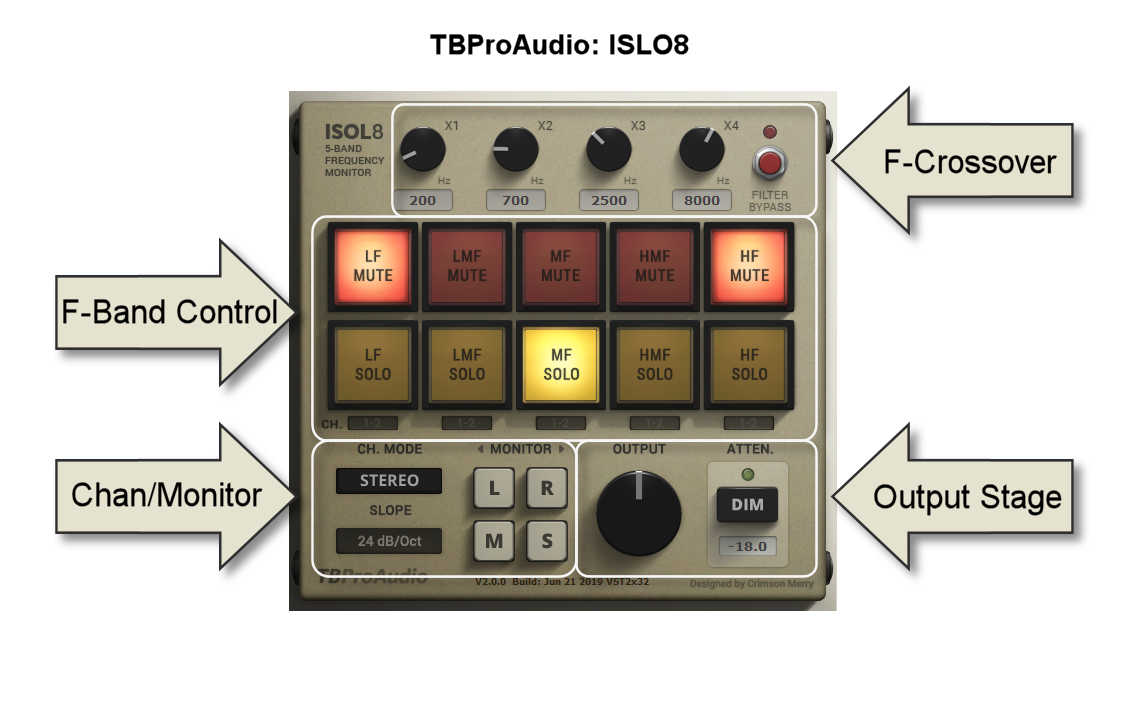
Isol8 is an advanced mix monitoring tool. It divides the frequency range into 5 bands. These 5 bands can be soloed or muted individually. This will help you to concentrate on certain frequency ranges during the mixing and mastering process.
On top you can use ISLO8 as a flexible multi-band splitter with following complex plugin chains. The split signal can finally be mixed together. Isol8 is originally designed to be used on the master track, but it can also be used on individual audio track busses.
Features:
https://www.tbproaudio.de/products/isol8

Vintage Keys
The soulful sound of the Wurlitzer, reborn.
Wurli brings the classic electric piano to life, combining its signature warmth and grit with modern sampling depth and lush atmospheric processing.
About the Instrument
Completing a trio of vintage electric pianos, Wurli captures the unmistakable charm of the classic Wurlitzer electric piano. Recorded from an original model at Nave Studios, it delivers everything from smooth, mellow tones to the signature growl that defined countless soul, pop, and rock records.
With its bespoke Atmosphere Layer, crafted from evolving pads and subtle textures, Wurli goes beyond traditional electric piano sounds. From expressive vintage warmth to immersive cinematic soundscapes, it’s a versatile instrument that bridges timeless character with modern creativity.
In Action
The Interface
Stereo Spread – Increasing the stereo spread will pan the lower notes to the left and the upper notes to the right.
Chorus – Control the intensity of the in-built chorus effect.
Atmosphere – Add an ethereal Atmosphere Layer pad to extend the sonic possibilities of the library.
Reverb – Control the overall volume of the built-in reverb. Click the settings cog for more controls.
Signal – Switch between a DI or amped signal, for a cleaner or more gritty sound.
Mechanical – Control the volume of the acoustic key and release noise picked up from the mics.
Settings Cog – Click the cog to the left of the interface to open up further settings.
Sample Start – Increase the sample start time to reduce latency. Decrease the sample start time for more realism. The latency above is the correct number for the use of negative delay (pre-delay) in your DAW MIDI settings.
Velocity Response – Increase the velocity response to accentuate the volume difference between soft and hard velocities. Reduce the slider to increase the volume of the soft dynamics.
https://fracturesounds.com/product/blueprint-wurli/
CraftLabs
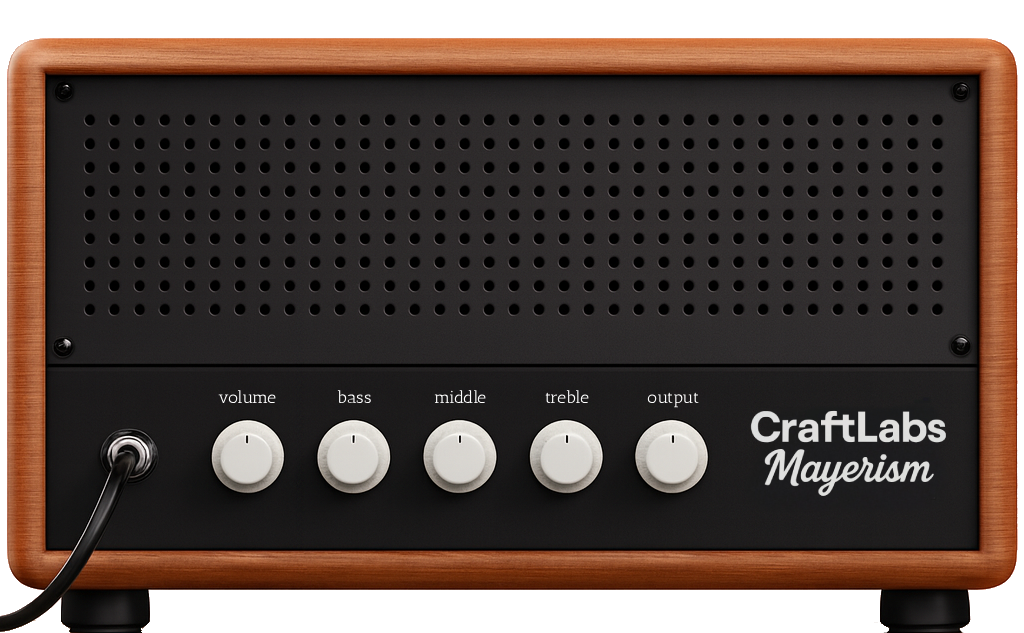
Mayerism
Versatile and completely free plugin designed for people in search of the soulful tone of a modern blues icon.
Mayerism Signature:
A meticulous recreation of the legendary boutique amplifier known for its blooming clean tones and articulate, vocal-like overdrive. Designed to capture the elusive magic of the world's most desired circuits, the Mayerism Signature offers unparalleled touch sensitivity and dynamic range.
Whether you’re chasing glass-like clarity or thick, sustaining lead tones, this amp responds instantly to your volume knob and picking attack, delivering the authentic, three-dimensional sound that so many players chase.

Busboy
Tone, clarity, and glue — all in one simple tool.
carve audio, busboy, shelf eq, mastering eq, audio plugin
Features:
Busboy was designed to serve your mix. It pairs rich, musical high and low shelves with precise high- and low-pass filters, then brings everything together with a compressor that delivers the warmth and cohesion of a classic bus chain. A final limiter adds clean peak control, helping your mixes feel finished, balanced, and under control.
Whether it’s tightening up your master bus, adding punch to drums, or polishing vocals, Busboy gives you pro-sounding results without the endless tweaking. The controls are simple, the response is musical, and the workflow makes mixing feel effortless — the way it should.
You will need to regist free your plugin.
DOWNLOAD FROM HERE TO HELP ME:
https://nitroflare.com/view/F0A8FC96F9FCB4B/Carve_Audio_-_Busboy_v1.0.11_Installer.exe
https://carveaudio.com/busboy/


Learn to Find the Key of a Song by Ear
Watch the video to get started.

Multi Layer Drum Sampler AU / VST Instrument
The MT Power Drum Kit is a free drum sampler offering the powerful, high-quality sounds of an acoustic, realistic drum kit. Samples have been specially recorded and processed to make them ideally suited for use in pop, rock and metal productions.
The MT Power Drum Kit Sampler differs from other, expensive drum samplers in that we have already pre-processed the sounds with compressors and EQs to make them a perfect fit for any mix. This is precisely where many drum sample programs fail. Some of the expensive plugins available on the market deliver a highly natural and dynamic drum kit sound as a solo instrument, but many fail as soon as they are supposed to be used for a complete mix in a powerful pop or rock production. Either the kick drum suddenly sounds much too slack or fuzzy in the mix, or the snare drum, which initially sounds natural and dynamic in solo mode, suddenly gets lost in the background in the overall mix, drowned out by the guitars and other instruments. But this is exactly where the MT Power Drum Kit is strongest. Its kick and snare drums come through clearly in any mixing situation – and still sound natural and not overly compressed.
The compressors built into the channels give you even more control over the level of compression.
You can choose from thousands of assorted rhythms in the comprehensive Groove Library and compose your own drum accompaniment. In particular, the innovative functions for creating fills generate very smooth and realistic drum tracks (see video).
Because we used high-quality cymbals and microphones for the recordings, the crash, ride and hi-hat cymbals sound especially refined and pleasant at various velocities.
As early as during microphoning of the set and recording of individual samples, we took great care to replicate realistic circumstances. Although doing so is almost impossible, we broke with tradition in sample recording, which calls for capturing every sound individually; Instead, our studio drummer played entire grooves. Then, we cut most of the necessary sounds out of the grooves, in various velocities, and processed them to deliver samples as realistic as possible. This is especially clear with our hi-hat samples, for instance. On the right-hand side, you can listen to demo tracks to hear the impressive results.
System Requirements:
PC: Windows 11 / 10 / 8 / 7 / Vista
Mac: OS X 10.5 or higher, Intel or ARM (M1/M2/M3/M4/M5/...) cpu
Linux: Ubuntu, Arch, Fedora, openSUSE
MT-PowerDrumKit will work in most hosts that support the VST, AAX or AU standards.
Tested hosts:
Ableton Live
Akai MPC
Ardour
Bitwig-Studio
Cakewalk
Cantabile
Cubase
Digital Performer
FL Studio
GarageBand
Jeskola BUZZ
LMMS (no drag and drop)
Logic
LUNA
Magix Music Maker
Mixbus
Mixcraft
MPC Beats
MuLab
Next
Nuendo
Pro Tools (v. 10 and higher)
Podium
Reaper
Reason
Renoise
Samplitude Music Studio
Sonar
SoundBridge (on Windows)
Studio One
Tracktion
Waveform

VST Alarm has launched a promotion on a collection of presets for the Vital spectral warping wavetable synthesizer.
Vital Calmness by Vicious Antelope is offered as a free download for the next few weeks.
The Vital Calmness soundbank is all about tranquility, offering 40 soothing pad presets for the Vital synth plugin. Designed around a sine-based wavetable, these presets are very close in terms of sounding and they deliver a calming tone. Perfect for ambient genres, they excel at adding a gentle, serene layer to your track whenever a touch of simplicity and peace is needed.
The soundset is free to download until February 15th, 2026.
https://vstalarm.com/?wpam_id=3

Waves Curves Resolve
Waves Audio has announced the release of its new Curves series effect plugin which is designed to solve mix conflicts automatically.
Curves Resolve is offered for free for two days only.
Curves Resolve provides an intelligent way of solving conflicts between multiple tracks in your mix. It processes one track by listening to another, carving space only when and where there’s a clash.
The result: no masking, no congestion, no mud. A cleaner mix that breathes, letting all your sounds fit together beautifully. And it’s almost impossible to overprocess – more transparent, with more control than any alternative.
Curves Resolve features
Solve mix conflicts – instantly.
Intelligent carving – both dynamic (real time) and steady (learned).
Intelligent ducking – wide (classic) and frequency specific (smart).
Snapshot controls – carving modes optimized for specific instruments.
Sidechain adjustment controls.
Includes Curves Resolve Live – zero latency version.
Available for Windows and Mac (VST3, AU and AAX), Curves Resolve is free through January 20th, 2026.
https://rekkerd.org/out/waves-curves-resolve/

TeAr: Free polyrhythmic & polyphonic MIDI arpeggiator plugin
Some of the links in this article may be affiliate links, which means I will receive a small commission if you make a purchase. There's no additional cost to you, and you'll directly support Rekkerd, thanks!
FX-Mechanics TeAr
FX-Mechanics has announced the release of a beta version of a free and open source polyrhythmic and polyphonic MIDI arpeggiator plugin.
Featuring 4 independent arpeggiator engines, each with its own pattern, subdivision, and MIDI output channel, TeAr is designed to create complex, evolving musical phrases and textures.
At its core, TeAr is scale-aware. You can select a root note and one of many scale types, and the arpeggiators will intelligently conform to that musical context. A “Follow MIDI In” mode allows the scale’s root to be changed dynamically by the notes you play.
TeAr features:
4 independent arpeggiator engines: Create complex polyrhythms and layered melodic lines.
Per-arp controls: Each engine has its own On/Off switch, pattern editor, subdivision, and MIDI output channel.
Powerful pattern language: A rich text-based language for defining arpeggio sequences with modifiers for velocity, octave, and pitch.
Comprehensive scale library: A wide selection of musical scales and modes to define the harmonic landscape.
Visual feedback: A real-time scale display highlights the active scale, its root, and the notes currently being played by each arpeggiator, color-coded for clarity.
TeAr for Windows and Linux is free to download in VST/VST3 plugin formats.
https://github.com/odoare/TeAr/releases

Tilr QDelay
Tilr has released a new delay effect plugin for Windows, Mac and Linux.
A dual-delay that is designed to be quick to use, QDelay is based on popular units such as Replika XT by Native Instruments and EchoBoy by Soundtoys.
The main goal is to create a free and open plug-in for my own productions, an alternative to the popular Deelay by SixthSample without premium versions or trimmed features or on-line activation.
QDelay features
Stereo Dual Delay with independent delay times and multiple modes.
Ping-Pong mode with feedback width control.
Tap mode with offset time (tap) and delay time.
Swing and Feel offset.
Accent odd or even taps.
Reverse delay.
Parametric EQ on feedback and input signal.
Diffusion on pre or post delay signal.
Modulation of delay line time.
Pitch Shifter on the feedback or post delay signal.
Saturation on pre and post delay signal (optionally on Feedback path).
Color, Bias and Dynamics controls for saturation.
Ducking to muffle the delayed signal on input.
Tape wow and flutter to add tone variation.
Taps preview display.
QDelay is available to download in VST3, AU, and LV2 plugin formats.
More information: Tilr
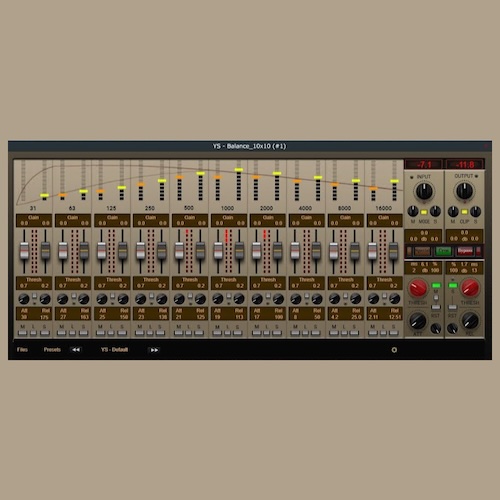
Plugin de áudio para mixagem.
Equalizador dinâmico de dez bandas com a possibilidade de usar nos modos Esquerda-Direita, Dois mono. Canal central-lateral.
O plugin tem duas versões, estéreo e mono, para economizar recursos do processador.
youtu.be/Rgot2U_KObQ
Se os controlos não forem exibidos devido a uma placa de vídeo fraca, substitua as imagens na raiz da pasta “Resources” do plugin por imagens com menor renderização
da pasta 101 . Por predefinição, todos os elementos estão configurados para uma transição suave com o quadro 201.
Agradecimento ao desenvolvedor:
yoomoney.ru/to/4100124...
https://drive.google.com/file/d/1mh5y7hiocgRe2cQbxz6KhIwQROfAwHbU/view

The purpose of this alpha build is to test the core features of Audacity 4 on a wide selection of hardware and operating systems.
Alpha 2 contains further work to bring Audacity 4 to feature parity with Audacity 3, as well as important bug fixes.
A note on compatibility
Projects saved in Audacity 4 are not backwards compatible. We recommend you make a copy of your important projects before opening them in Audacity 4.
What's implemented
Recording and playback
Editing audio
Applying destructive and real-time effects
Exporting audio files
Saving and recalling custom Workspaces
What's not implemented
Some yet-to-be finalized features might appear non-functional, or have been excluded from Audacity's interface. These are features not yet ready for user testing, and have been disabled.
Nyquist, LADSPA and VAMP and the OpenVINO plugins
Preferences from Audacity 3 are not carried over
Envelopes and label tracks
Spectrogram view and the spectral editing mode
Most built-in effects, including generators and analyzers
Opening multiple projects at the same time
Notable changes since alpha-1
Allow track range selection using Shift-Enter (#9600)
Record from anywhere (#9540)
Export loop region (#9489)
Preference for paste behavior (#9612)
Preference for whether clicking on ruler should trigger playback (#9707)
Create loop region only when Control / Cmd key is pressed (#9712)
Smoother playhead (#9613)
Ultimate Vocal Remover v5 The best vocal remover application on the internet, and it's totally free and open source! Available on Wind...