Bogren Digital has introduced a free IR loader plugin featuring multi-slot blending, per-slot EQ and phase controls, and library management tools designed for working through large IR collections.
IRDX Studio supports blending up to 5 IR slots via a graphical mixer. Each slot carries individual 5-band EQ, resonance, and phase adjustment. Any blended IR combination can be exported as a single .wav file, with hardware-specific presets for popular modelers included.
An optional $49 USD upgrade activates the company’s proprietary IRDX Technology speaker emulation. The company describes it as modeling the dynamic response of a physical speaker cabinet, where individual notes and chords react differently rather than producing a consistent, static tone.
IRDX technology, developed by producer Jens Bogren, uses advanced machine learning methods to reconstruct the difference between a real cab and an impulse response. The end result is a guitar amp sim that reacts like a real amp, easily fits in a mix without sounding stale, and feels great when playing through.
The upgrade can be trialed for 7 days from within the plugin before purchase.
IRDX Studio for Windows and Mac (VST3, AU and AAX) is available now as a free download at Plugin Boutique and from the Bogren Digital store.
KG Series, a free collection of 12 audio plugins designed to provide affordable (or rather, free) creative tools for music producers.
KAGE Music have introduced the KG Series, a collection of free, analogue-inspired audio plug-ins aimed at lowering barriers for music creators. The series includes a range of tools from equalisers and compressors to saturators and reverb, all designed with proprietary signal processing to emulate the behavior of real analogue circuits.
The KG Series is designed for artists at all levels, from beginners seeking affordable access to professional tools, to experienced producers looking for versatile analogue-style processing in a stress-free creative environment. Each plug-in is designed using a node-based circuit simulation engine to faithfully replicate the sonic characteristics of analog hardware, from transistors and capacitors to tube emulation.
The KG Series includes the following plug-ins:
KG-EQP – Analogue-style equaliser for warmth and depth
KG-FREQ6 – 6-band equaliser for detailed tonal shaping
KG-SUB – Low-end enhancer for smooth sub frequencies
KG-CLARITY – Vocal and mix clarity enhancer
KG-COMP – Dual-stage dynamic compressor with warm character
KG-2A – Optical-style compressor with analogue warmth
KG-DEESSER – Transparent sibilance reduction for vocals
KG-TUBE – Analogue-style saturator adding depth and harmonics
KG-SATURATOR – Three-band saturator with vintage tone and noise options
KG-VERB – Analogue-style reverb for natural spatial effects
KG-ARCL – Auto-release limiter providing smooth dynamic control
Just want to re-share, since the sites is down at the moment , and i only found one site that mirror this, i tried only the vst3 x64 version and works in ableton
Here’s a free plugin for you: a greatest hits of our catalog’s gnarliest sounds.
We took the opto compressor from Tupe, one of the tube Soft Clip saturations from VCME, and the FE90 cassette tape model (from Tupe Wow) — then we put all of them into a free plugin.
Can it do everything? No. Can it destroy your signal with analog goodness? Yes. And does it look like a map of a freeway in Southern California? Also yes.
The opto compressor from Tupe
The “Chino” soft clip saturation mode from VCME
Our FE90 cassette tape model and tape speed control (from Tupe Wow)
Our brickwall limiter (also from VCME)
Why did we make this plugin?
Our current lineup of free plugins (Midside Matrix & Loudness) are incredible utilities that help you do precise audio engineering. But they are, at the end of the day, utilities. That is, they’re a little buttoned-up. So we thought, shouldn’t we have a free plugin that’s a little more… fun? That’s LA-210.
Why is it named after a freeway in the San Gabriel Valley of Southern California?
The 210 freeway has always been a mainstay in the life of Goodhertz. Since our inception, we’ve been based in the northern San Gabriel Valley. And, these days, the fastest way to get from one cofounder’s house to the other is usually to take the 210 (either by car or by train (the train runs in the middle of this section of the 210)). Also, it’s fun to make a plugin that looks like a map of a highway.
Why is this free plugin in beta?
We want to know what you think of it before we call it done! We’re not sure how many rounds of betas we’ll be doing, but stay tuned to our newsletter if you want to know when new betas come out.
Will this plugin no longer be free when it comes out of beta?
Meltopia has introduced a Windows utility that lets users turn MIDI controllers/keyboards into control surfaces for shortcuts, macros, app/system volume, preset switching, and soundboard/sample triggering.
MIDI Command Studio is more than a basic MIDI-to-shortcut app. It allows MIDI controls to be mapped to shortcuts, macros, and volume controls, while also letting a single controller be configured for multiple applications and switched between them instantly. This makes it possible for one device to behave like several purpose-built controllers. The free version can be tested with your own setup first, and if it already does what you need, you can simply keep using it.
Features:
Windows standalone app.
Works with MIDI buttons, knobs, faders and encoders.
Maps MIDI controls to keyboard shortcuts, macros, app/system volume and soundboard actions.
Per-device presets with quick switching.
LED and motorised fader feedback on supported devices.
A free version of the software is available, with a paid license to unlock higher limits is priced $16.99 USD.
LIMITED FREE DOWNLOAD: Shortnoise 1 Electronic Music Sample Library for Kontakt
INSPIRING ELECTRONIC SAMPLE LIBRARY WITH A HUGE 6GB OF CONTENT!
Shortnoise 1 is a unique and inspiring electronic sample library with a huge 6GB of content and over 300 Kontakt instruments to choose from.
Jam packed full of Electronic Grooves, Arpeggiated Sequences, Manipulated Synths, Cinematic FX, Unique and Expressive Performance Patches, this beauty has a whole world of surprises waiting to be unleashed!
Perfect for electronic music, film scores and experimental sound design.
Don’t miss out on this exclusive offer!
NOTE: Full version of Kontakt 4 / 5 required. Not compatible with free Kontakt Player
Semedo EQ — Professional 24-Band Equalizer for Windows VST3
Semedo EQ is a modern 24-band parametric equalizer built for producers, mixing engineers, and mastering-focused workflows. It combines surgical EQ control, dynamic processing, advanced visual feedback, and musical tone-shaping tools inside one fast, visual interface.
Designed for precision and speed, Semedo EQ lets you shape tone, control resonances, tighten the low end, analyse the stereo image, add compression, and apply harmonic saturation without leaving the plugin.
Main EQ Layer.
The main EQ view gives you full control over 24 parametric bands with a clear spectrum display and fast band editing.
You can use Semedo EQ for broad tonal shaping, precise surgical cuts, resonance control, stereo correction, and mastering adjustments. Each band can be adjusted with detailed frequency, gain, Q, slope, filter type, and stereo placement controls.
Key features:
24-band parametric EQ.
Bell, shelf, cut, notch, band-pass, tilt, and all-pass style filtering.
Per-band Stereo, Mid, Side, Left, and Right placement.
Dynamic EQ per band.
Threshold, attack, release, ratio, and dynamic range control.
Linear Phase and Zero Latency workflow options.
Spectrum analyser with pre/post viewing.
EQ Match tools.
Spectrum Grab for quickly turning peaks into EQ bands.
Harmonic ruler tools for musical frequency decisions.
Mono-Below control for tighter low-end translation.
Peak labels, freeze, and analyser response options.
Ear Mode
Ear Mode is a listening-first EQ layer designed to help you make faster musical decisions.
Instead of only looking at a graph, Ear Mode presents the EQ bands in a clean strip-style layout. This makes it easier to focus on what each band is doing: adding weight, removing mud, controlling harshness, opening air, or shaping presence.
Useful for:
Quick mix decisions.
Gain-focused EQ moves.
Working by ear instead of only by sight.
Managing all 24 bands in a console-style layout.
Fast access to band type, frequency, Q, stereo placement, and dynamics.
Perceptual / Mastering View.
The Perceptual View is built for deeper listening and mastering decisions. It helps you understand not only what the spectrum shows, but how the sound may be perceived.
This layer includes equal-loudness-style visual feedback, pinned frequency readouts, low-end translation information, and stereo safety context.
Key features:
Perceptual spectrum view.
Linear vs perceptual frequency readouts.
Delta-style frequency comparison.
Pin important frequency points for reference.
Low-end translation guidance.
Mid/Side and stereo-width context.
Correlation and vectorscope-style monitoring.
Crest / punch information.
Mastering-focused visual feedback for bass, presence, and air.
Semedo Compress Layer
Semedo EQ also includes an integrated compressor layer called Semedo Compress.
This gives you broadband compression directly inside the EQ workflow, so you can control dynamics without loading a separate compressor. It includes different compression characters and live visual feedback, making it easier to see and hear how much compression is being applied.
Key features:
Classic, Opto, and VCA compression styles.
Stereo, Mid, Side, Left, and Right compression modes.
Threshold, ratio, knee, attack, release, makeup, range, and wet controls.
RMS detection mode.
Live gain-reduction display.
Transfer curve display.
Pre/post audio movement display.
Useful for glue, control, punch, and mastering-style compression.
Semedo Saturation Layer
The Saturation Layer adds harmonic colour and controlled drive after the EQ and compressor workflow.
It is designed to add warmth, punch, edge, or heavier tone while still giving you safety controls such as mix, tone, output trim, low/high focus filters, oversampling, and auto makeup.
Key features:
Harmonic saturation and drive.
Clean, Warm, Punch, Crunch, and Smash macro programs.
Drive, bias, mix, tone, output, dynamic amount, and focus controls.
Low-cut and high-cut focus for safer saturation.
Auto Makeup option.
Oversampling options.
Stereo, Mid, Side, Left, and Right saturation modes.
Pre/Post EQ placement options.
Live harmonic and heat-style feedback.
Advanced Workflow Tools
Semedo EQ is made for fast professional workflow, not just basic EQ moves. It includes advanced tools that help you analyse, compare, and make better decisions faster.
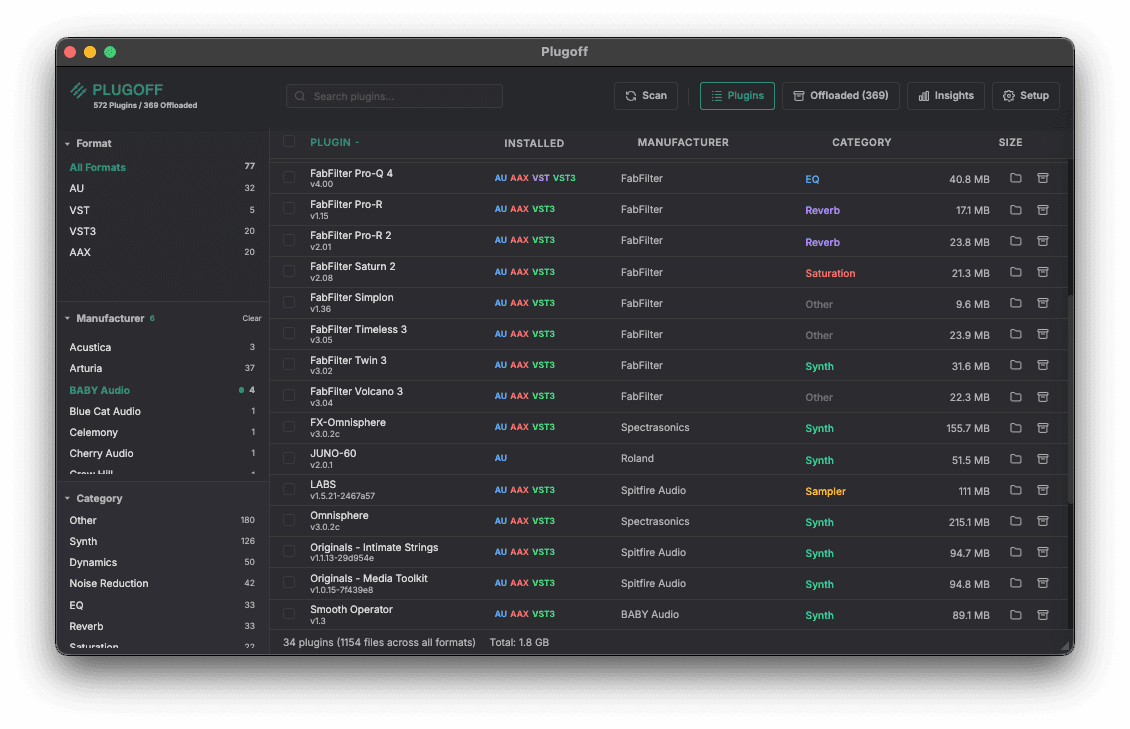
Plugoff scans, organises, and offloads your audio plugins so your DAW loads faster and your sessions stay clean.
Free for Mac and Windows. AU, VST, VST3, and AAX.
Your plugin library, tidied up.
Unused plugins can be offloaded to a folder or external drive, leaving just the plugins and formats you need. Your DAW will load faster and won’t be littered with outdated or demo plugins.
Features:
Everything you need.
Plugin Organiser
Automatically filters and sorts by manufacturer, plugin type, and format (AU/VST/VST3/AAX).
Plugin Offloading
Move unused plugins to a safe vault folder and restore them instantly when needed, or permanently delete them later on.
UAD License Detection
Separate Universal Audio authorised, demo, and expired plugins and offload the ones you don’t own.
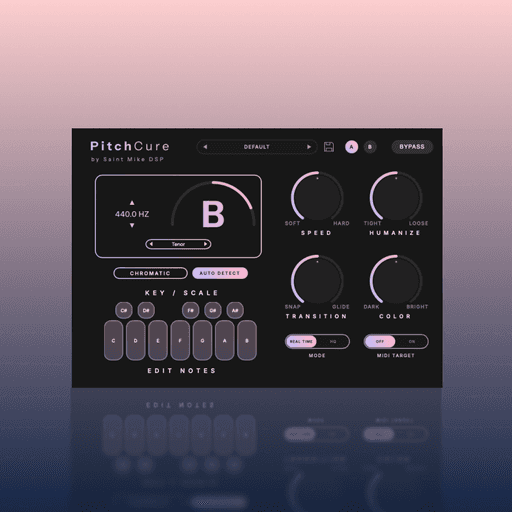
Most vocal tuners make you choose. You can sound perfectly in tune, or you can sound human. PitchCure gives you both.
It is a high-end vocal tuner. Some plugins turn real singing into robot sounds. PitchCure does not do this. It tracks the voice and keeps the real feeling safe. Words stay crisp. Breaths stay natural. The tuning feels subtle and natural.
It is built for fast work. You do not have to draw lines on a screen. Find your key with one click. Pick your voice range. Then, turn the main knobs.
Use Speed to fix bad notes. Turn up Humanize to keep the song's emotion. Use Transition for smooth slides between notes. Use the Color knob to add rich tone.
You might want hidden tuning for a quiet song. You might want fast tracking in the vocal booth. Or, you might want vocals locked to your MIDI chords. PitchCure gives you great pitch that still sounds human.
Features:
Transparent Tuning: Artifact-free, time-domain pitch shifting without metallic phase-smearing.
Vibrato Protection: The Humanize engine actively maps and preserves natural vibrato and emotional expression.
Fluid Transitions: Control the glide between notes—from instant hard-snaps to smooth, natural portamento.
Auto Key & Custom Scales: One-click key detection, or build your own scales using the interactive Edit Notes matrix.
MIDI Target: Override the scale and force the vocal to follow the exact chords or melodies you play on your keyboard.
One-Knob Color EQ: A built-in tilt EQ to instantly add chest warmth (Dark) or brilliant air (Bright).
Live Tracking Ready: Near-zero latency in Real Time mode, or switch to HQ for maximum processing quality during mixdown.
Ultra-Light CPU: Highly optimized to run at low CPU, easily handling massive multi-vocal sessions.
U-he Zebra 3, the long-awaited successor of the Zebra 2 modular Synthesizer plugin is now ready for test in public beta
Since mid-December 2025, u-he Zebra 3 has been in public beta. That was a wonderful Christmas present from Santa Urs. Now, four months later, it’s April, and the fine-tuning of Zebra 3 has progressed significantly.
So much so that the u-he developers have now released the final beta with the build 21625.
Final Beta
The final beta is now available for download on the KVR forum. It includes all the features planned for the 3.0 release. However, one thing has changed significantly: Zebra 3 now has its final UI.
U-he says the new vector-based UI offers a vastly decluttered interface, a more consistent parameter layout, new color-coded modulation and modules, a modmatrix, and more.
I actually really liked the Zebra 3 beta UI. The leap from that to the new one is quite big. It takes some getting used to.
According to the developers, the new version can be further customized to better fit your workflow. And they ask the users to spend a week with the new one before asking for the old one back.
In case you don’t like it, I’m sure Plugmon, a UI designer, will offer alternative skins for it in the future. Alongside the new UI, it comes with feature improvements and numerous bug fixes. The final beta includes over 1,200 polished factory presets.
The testing will be finished soon. This is the last beta to accept the beta license card, which expires in July 2026. At the same time, they announced a deal for everyone who doesn’t yet have a Zebra 3 license.
Besides the 30€ for existing Zebra 2 users and a free update for Zebra HZ users, they offer Zebra 3 at a special introductory price of 179€ instead of 249€. This offer is for new users and Zebra Legacy users.
Zebra 3 is on the home stretch. There’s light at the end of the tunnel. Many had long doubted that this moment would ever come. A great moment after so long waiting and testing.
Chord Dock Lite: Free chord progression editor plugin
Chord Dock
k2get has recently released version 1.5 of its a chord track-style plug-in for building, visualizing, and sharing chord progressions on a timeline.
Chord Dock Lite is designed for songwriters and producers who want to create and edit chord progressions on a timeline directly inside their DAW, organize sections such as Verse and Chorus, keep the harmonic structure of the whole song in view, and export progressions instantly as MIDI.
Chord Dock Lite features:
Timeline-based chord progression editing.
Section-based workflow.
Section Clips / Focus Edit.
Save and load progression files.
Instant MIDI drag export.
The plugin is available in VST3 and AU plugin formats for Windows and macOS. An Extended Edition is on sale for the intro price of $19 USD through April 30th, 2026 (regularly $25 USD). It unlocks tensions, slash chords, interactive Circle of Fifths, Arpeggio / Bassline, Reharmo, user preset save, and custom themes.
Build, visualize, and share chord progressions.
A chord-track-style workflow with reharmonization
Chord Dock v1.5 lets you see the whole progression on a timeline, edit it visually, then reharmonize it and generate section-based Arpeggio / Bassline from the same progression.
Lite and Extended share the same installer. Start with Lite for free, then unlock Extended whenever you need more.