Meltopia has introduced a Windows utility that lets users turn MIDI controllers/keyboards into control surfaces for shortcuts, macros, app/system volume, preset switching, and soundboard/sample triggering.
MIDI Command Studio is more than a basic MIDI-to-shortcut app. It allows MIDI controls to be mapped to shortcuts, macros, and volume controls, while also letting a single controller be configured for multiple applications and switched between them instantly. This makes it possible for one device to behave like several purpose-built controllers. The free version can be tested with your own setup first, and if it already does what you need, you can simply keep using it.
Features:
Windows standalone app.
Works with MIDI buttons, knobs, faders and encoders.
Maps MIDI controls to keyboard shortcuts, macros, app/system volume and soundboard actions.
Per-device presets with quick switching.
LED and motorised fader feedback on supported devices.
A free version of the software is available, with a paid license to unlock higher limits is priced $16.99 USD.
LIMITED FREE DOWNLOAD: Shortnoise 1 Electronic Music Sample Library for Kontakt
INSPIRING ELECTRONIC SAMPLE LIBRARY WITH A HUGE 6GB OF CONTENT!
Shortnoise 1 is a unique and inspiring electronic sample library with a huge 6GB of content and over 300 Kontakt instruments to choose from.
Jam packed full of Electronic Grooves, Arpeggiated Sequences, Manipulated Synths, Cinematic FX, Unique and Expressive Performance Patches, this beauty has a whole world of surprises waiting to be unleashed!
Perfect for electronic music, film scores and experimental sound design.
Don’t miss out on this exclusive offer!
NOTE: Full version of Kontakt 4 / 5 required. Not compatible with free Kontakt Player
Semedo EQ — Professional 24-Band Equalizer for Windows VST3
Semedo EQ is a modern 24-band parametric equalizer built for producers, mixing engineers, and mastering-focused workflows. It combines surgical EQ control, dynamic processing, advanced visual feedback, and musical tone-shaping tools inside one fast, visual interface.
Designed for precision and speed, Semedo EQ lets you shape tone, control resonances, tighten the low end, analyse the stereo image, add compression, and apply harmonic saturation without leaving the plugin.
Main EQ Layer.
The main EQ view gives you full control over 24 parametric bands with a clear spectrum display and fast band editing.
You can use Semedo EQ for broad tonal shaping, precise surgical cuts, resonance control, stereo correction, and mastering adjustments. Each band can be adjusted with detailed frequency, gain, Q, slope, filter type, and stereo placement controls.
Key features:
24-band parametric EQ.
Bell, shelf, cut, notch, band-pass, tilt, and all-pass style filtering.
Per-band Stereo, Mid, Side, Left, and Right placement.
Dynamic EQ per band.
Threshold, attack, release, ratio, and dynamic range control.
Linear Phase and Zero Latency workflow options.
Spectrum analyser with pre/post viewing.
EQ Match tools.
Spectrum Grab for quickly turning peaks into EQ bands.
Harmonic ruler tools for musical frequency decisions.
Mono-Below control for tighter low-end translation.
Peak labels, freeze, and analyser response options.
Ear Mode
Ear Mode is a listening-first EQ layer designed to help you make faster musical decisions.
Instead of only looking at a graph, Ear Mode presents the EQ bands in a clean strip-style layout. This makes it easier to focus on what each band is doing: adding weight, removing mud, controlling harshness, opening air, or shaping presence.
Useful for:
Quick mix decisions.
Gain-focused EQ moves.
Working by ear instead of only by sight.
Managing all 24 bands in a console-style layout.
Fast access to band type, frequency, Q, stereo placement, and dynamics.
Perceptual / Mastering View.
The Perceptual View is built for deeper listening and mastering decisions. It helps you understand not only what the spectrum shows, but how the sound may be perceived.
This layer includes equal-loudness-style visual feedback, pinned frequency readouts, low-end translation information, and stereo safety context.
Key features:
Perceptual spectrum view.
Linear vs perceptual frequency readouts.
Delta-style frequency comparison.
Pin important frequency points for reference.
Low-end translation guidance.
Mid/Side and stereo-width context.
Correlation and vectorscope-style monitoring.
Crest / punch information.
Mastering-focused visual feedback for bass, presence, and air.
Semedo Compress Layer
Semedo EQ also includes an integrated compressor layer called Semedo Compress.
This gives you broadband compression directly inside the EQ workflow, so you can control dynamics without loading a separate compressor. It includes different compression characters and live visual feedback, making it easier to see and hear how much compression is being applied.
Key features:
Classic, Opto, and VCA compression styles.
Stereo, Mid, Side, Left, and Right compression modes.
Threshold, ratio, knee, attack, release, makeup, range, and wet controls.
RMS detection mode.
Live gain-reduction display.
Transfer curve display.
Pre/post audio movement display.
Useful for glue, control, punch, and mastering-style compression.
Semedo Saturation Layer
The Saturation Layer adds harmonic colour and controlled drive after the EQ and compressor workflow.
It is designed to add warmth, punch, edge, or heavier tone while still giving you safety controls such as mix, tone, output trim, low/high focus filters, oversampling, and auto makeup.
Key features:
Harmonic saturation and drive.
Clean, Warm, Punch, Crunch, and Smash macro programs.
Drive, bias, mix, tone, output, dynamic amount, and focus controls.
Low-cut and high-cut focus for safer saturation.
Auto Makeup option.
Oversampling options.
Stereo, Mid, Side, Left, and Right saturation modes.
Pre/Post EQ placement options.
Live harmonic and heat-style feedback.
Advanced Workflow Tools
Semedo EQ is made for fast professional workflow, not just basic EQ moves. It includes advanced tools that help you analyse, compare, and make better decisions faster.
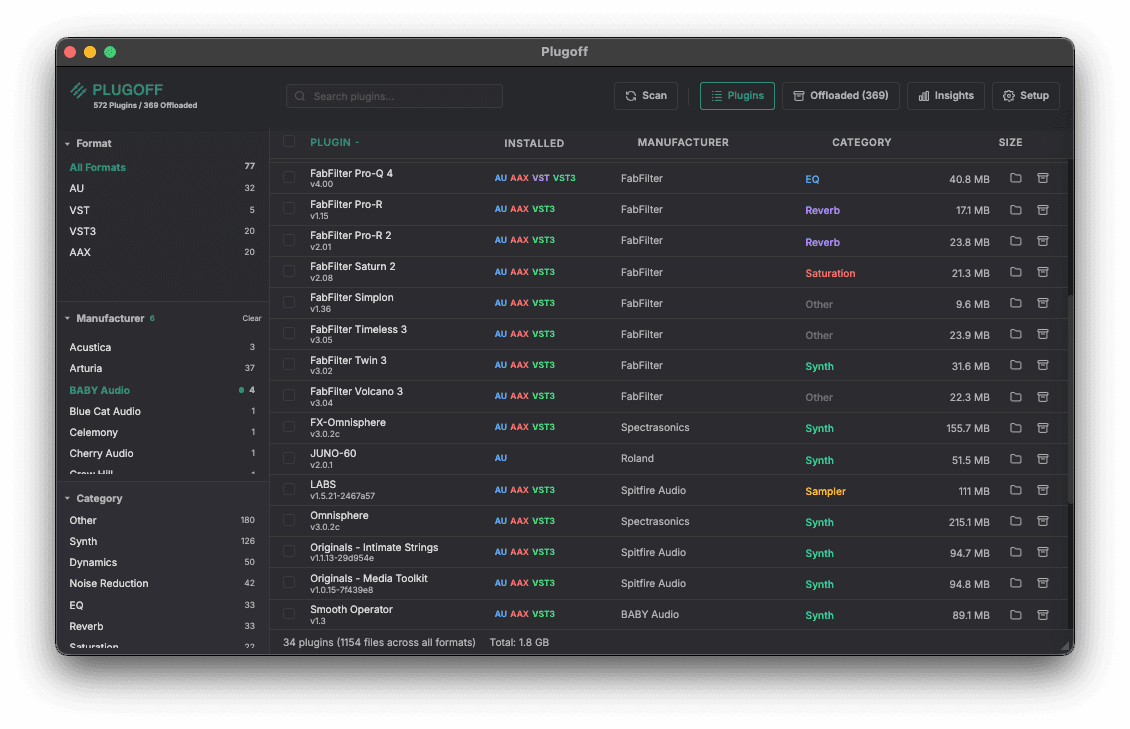
Plugoff scans, organises, and offloads your audio plugins so your DAW loads faster and your sessions stay clean.
Free for Mac and Windows. AU, VST, VST3, and AAX.
Your plugin library, tidied up.
Unused plugins can be offloaded to a folder or external drive, leaving just the plugins and formats you need. Your DAW will load faster and won’t be littered with outdated or demo plugins.
Features:
Everything you need.
Plugin Organiser
Automatically filters and sorts by manufacturer, plugin type, and format (AU/VST/VST3/AAX).
Plugin Offloading
Move unused plugins to a safe vault folder and restore them instantly when needed, or permanently delete them later on.
UAD License Detection
Separate Universal Audio authorised, demo, and expired plugins and offload the ones you don’t own.
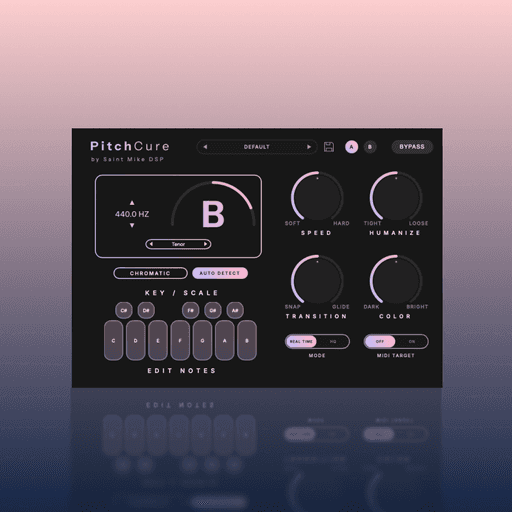
Most vocal tuners make you choose. You can sound perfectly in tune, or you can sound human. PitchCure gives you both.
It is a high-end vocal tuner. Some plugins turn real singing into robot sounds. PitchCure does not do this. It tracks the voice and keeps the real feeling safe. Words stay crisp. Breaths stay natural. The tuning feels subtle and natural.
It is built for fast work. You do not have to draw lines on a screen. Find your key with one click. Pick your voice range. Then, turn the main knobs.
Use Speed to fix bad notes. Turn up Humanize to keep the song's emotion. Use Transition for smooth slides between notes. Use the Color knob to add rich tone.
You might want hidden tuning for a quiet song. You might want fast tracking in the vocal booth. Or, you might want vocals locked to your MIDI chords. PitchCure gives you great pitch that still sounds human.
Features:
Transparent Tuning: Artifact-free, time-domain pitch shifting without metallic phase-smearing.
Vibrato Protection: The Humanize engine actively maps and preserves natural vibrato and emotional expression.
Fluid Transitions: Control the glide between notes—from instant hard-snaps to smooth, natural portamento.
Auto Key & Custom Scales: One-click key detection, or build your own scales using the interactive Edit Notes matrix.
MIDI Target: Override the scale and force the vocal to follow the exact chords or melodies you play on your keyboard.
One-Knob Color EQ: A built-in tilt EQ to instantly add chest warmth (Dark) or brilliant air (Bright).
Live Tracking Ready: Near-zero latency in Real Time mode, or switch to HQ for maximum processing quality during mixdown.
Ultra-Light CPU: Highly optimized to run at low CPU, easily handling massive multi-vocal sessions.